
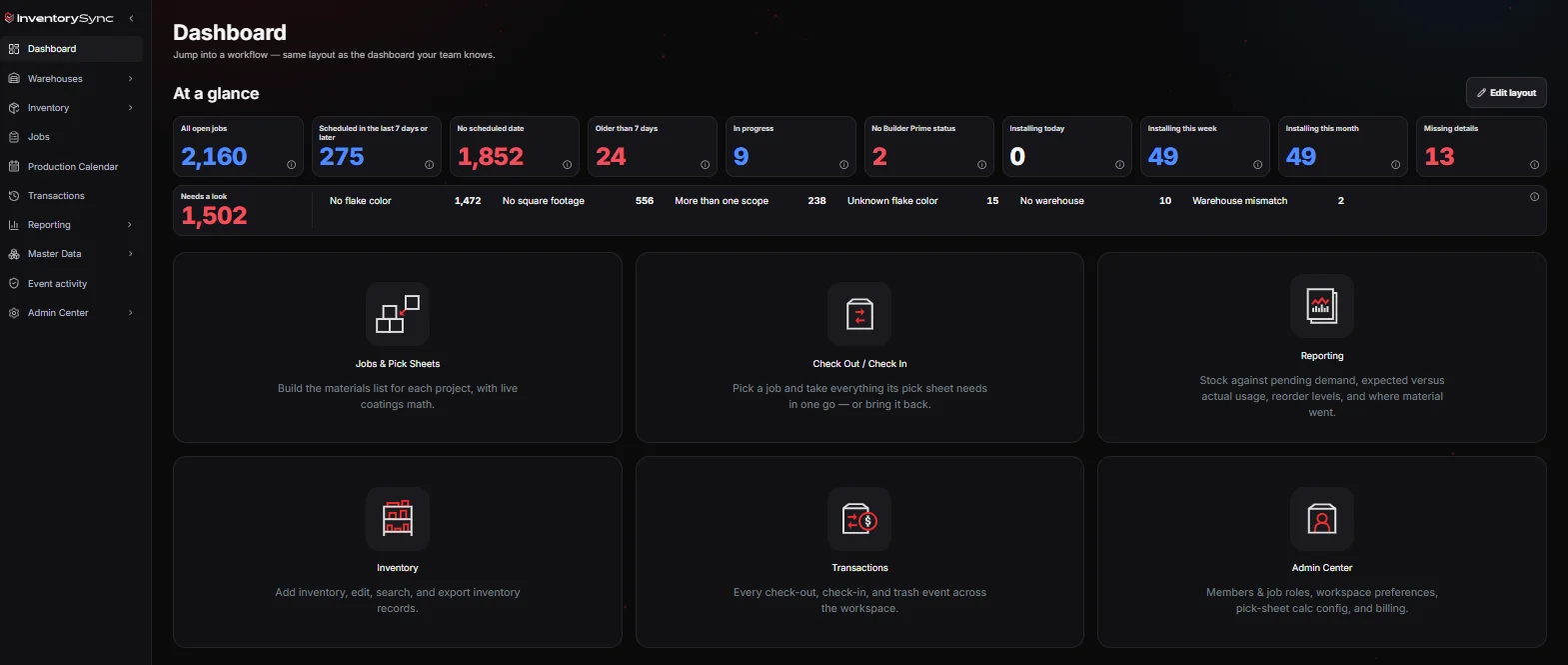
One inventory system for every job you run.
Inventory Sync connects to your CRM, puts every job on a production calendar, and tracks every product from the warehouse shelf to the install and back.
Liquids
- Floor coatings
- Painting
- Wall coverings
Materials
- Bathroom remodeling
- Showers
- Kitchens
- Roofing
- Gutters
Run more than one company? Switch between them in one click.
From the job in your CRM to the report on your desk.
Jobs flow in on their own. Parts get ordered and received. Crews scan material out and back. You see what every job used and what it cost.
Your CRM
Jobs start where you already sell them.
Nightly sync
New jobs and updates flow in automatically.
Review & order
Parts are reviewed, ordered and received. Liquids are automatic.
Production calendar
Every job on its install day, by warehouse.
Check‑in & check‑out
Crews scan material out and back in.
Reporting
See what every job used and what it cost.
Everything you need to run your inventory
Warehouses & stock
- WarehousesEvery location and every shelf in one place.
- Inventory & recordsEvery product and every movement on record.
- Check-in & check-outFast barcode scanning for your crews.
- Count stockQuick, accurate counts, blind if you want.
- Count varianceSee every count difference in units and dollars.
- Stock transfersMove stock between warehouses in a few clicks.
- Reserved stockStock set aside for a job is never promised twice.
Purchasing
- Low-stock reordersKnow what to order before you run out.
- In stock or to buyEvery part shows if it's on the shelf or needs ordering.
- Purchase ordersNumbered orders for each vendor, ready to send.
- ReceivingCheck in full or partial orders as they arrive.
Jobs
- JobsEvery job's materials, planned and used.
- Job boardEvery job by stage, from sold to installed.
- Production calendarSee what's installing, where and when.
- Parts lists from the saleEach job's parts list is built from what was sold.
- Good, better, bestOnly the option your customer picked is counted.
- Installer notesNotes for the install team on every job.
Team & control
- CrewsBuild crews with a lead and installers.
- Custom permissionsEach person sees exactly what they should.
- Event activitySee what everyone is doing in the system.
- NotificationsThe right person gets an email at every step.
- Guided toursBuilt-in walkthroughs get your team up to speed fast.
Costs & reporting
- ReportingComplete visibility into your operation.
- Job costingKnow what every job really cost.
- Estimated vs. actualThe cost you quoted next to the cost you paid.
- Profit per jobSee what every job made against its sale price.
- Crew usage varianceSee how each crew performs on similar jobs.
- Accounting exportPurchases and stock changes, ready for your accountant.
Connections
- CRM integrationSyncs with your CRM, so jobs never get typed twice.
- Updates your CRMFinished jobs are marked complete in your CRM automatically.
- Open APIIntegrate with anything.
And it's fully customizable, so the system fits the way your company works.
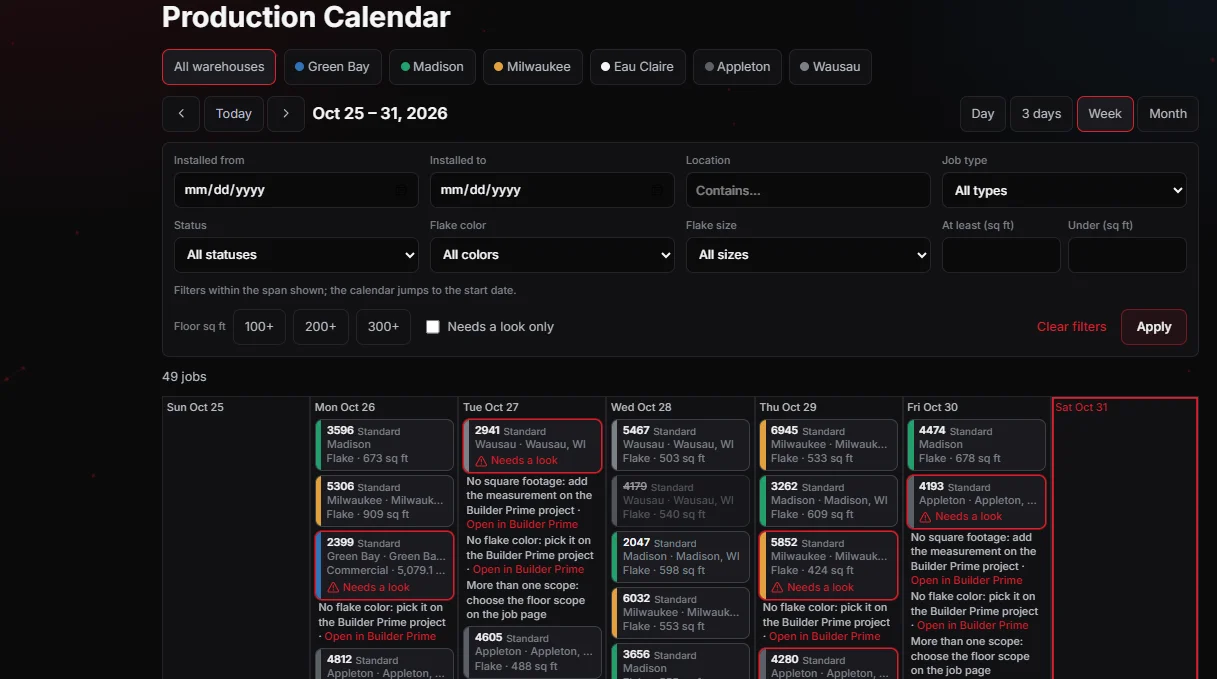
Your whole schedule, by warehouse.
See every job on its install day. When something's missing, like a square footage or a color, the job is flagged "Needs a look," with a link straight to the job in your CRM.
Built for liquids and materials.
Liquids
- Floor coatings
- Painting
- Wall coverings
- Calculated pick sheets
- Product catalog
- Cost per square foot
Materials
- Bathroom remodeling
- Showers
- Kitchens
- Roofing
- Gutters
- Counted pick sheets
- Product catalog
- Kits
- Parts catalog
Deep insight into your whole operation.
Know where every job's material actually went, what it cost, and how every crew is performing, long after the sale.
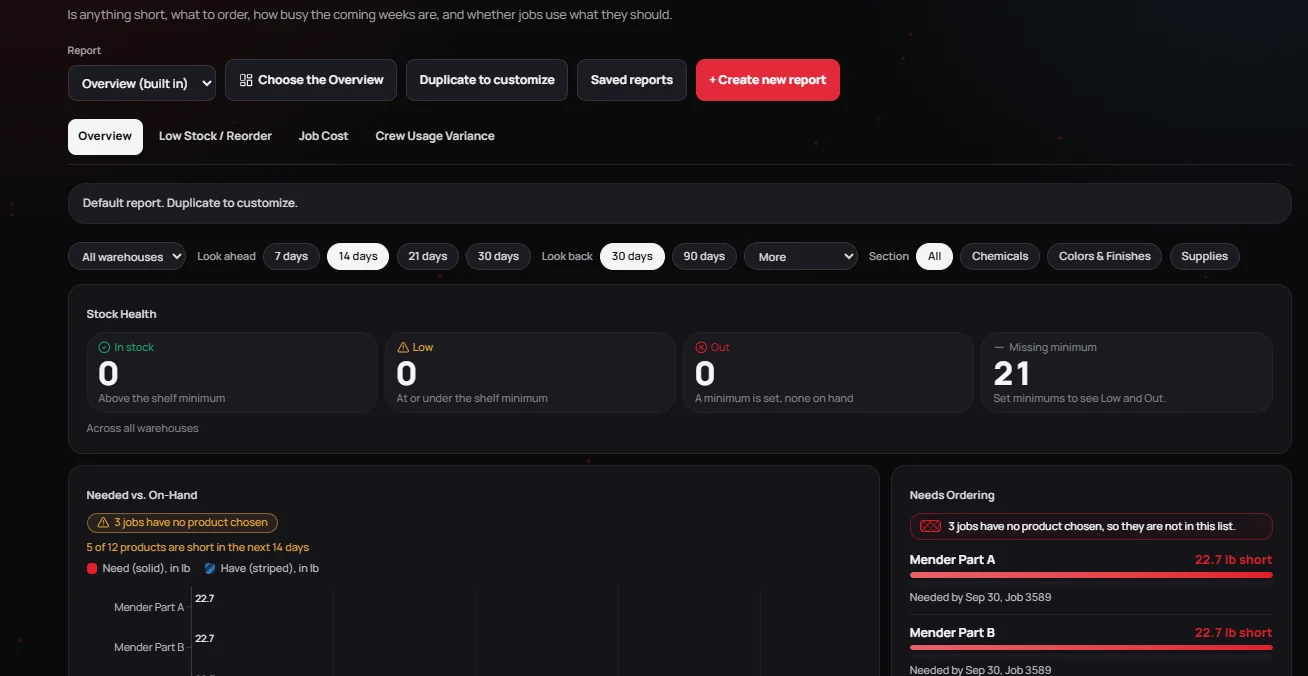
The default report: stock health, what's short, what to order, and what's coming up.
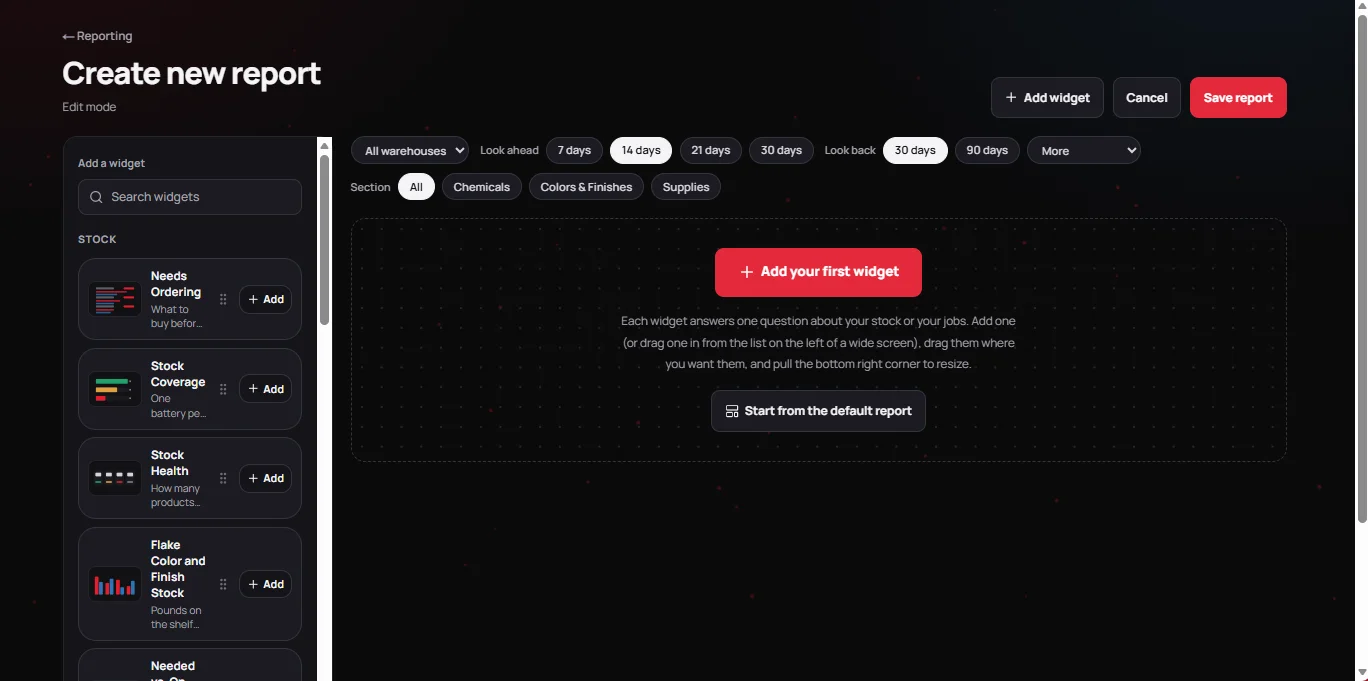
Build your own reports
Add widgets, drag them where you want, and share reports with your team.
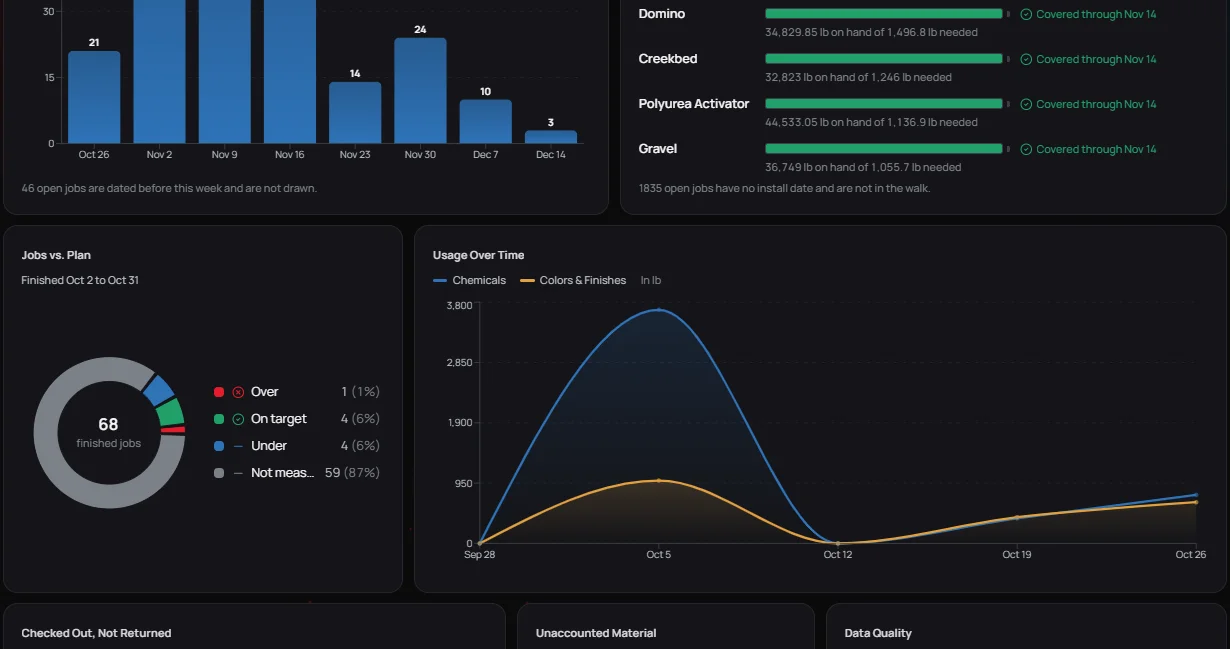
Track every trend
Jobs against plan, usage over time, and stock coverage by product.
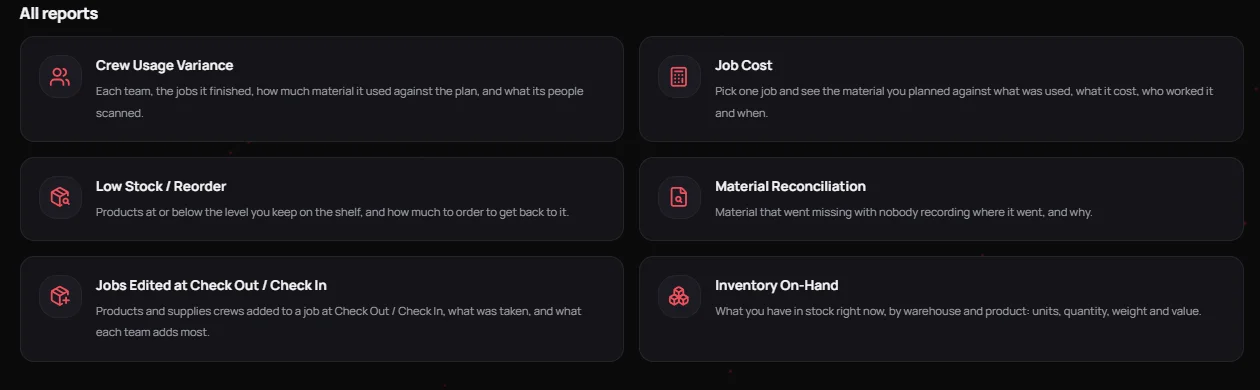
Ready-made reports
Crew usage variance, job costing, low stock, missing material and more, ready to run.
Crews
Build crews with a lead and installers, then compare how each crew performs on jobs of the same size.
- Crew leads
- Installers
- Crew usage variance
Custom permissions
Decide exactly what each person can see and do.
- Installer
- Team Lead
- Warehouse
- Office
- Admin
- + Custom roles
Security
Every action is protected and on the record.
- Two-factor sign-in
- Activity history
- Event log
- Warehouse-level access
Never run short.
Inventory Sync tells you when stock is running low and what to order. Want it handled for you? We can set up automatic restocking that connects to the software you already buy from.
- Low-stock alerts
- Reorder lists, ready to send
- Automatic restocking
That spreadsheet isn't tracking your inventory anymore. It's just guessing.
Inventory Sync gives you real visibility across every warehouse, every job, and every item, so material loss and skimming stop being a mystery and that spreadsheet you've rebuilt a dozen times can finally retire.
Book a Discovery Call
Want to see it before you commit? No pressure, no generic demo. A real conversation about your warehouses, your crews, and where material's actually going.
Own more than one company? Bring them all to the call.
Book a Discovery Call → Or Create Your Account →
New features. No charge. About a week.
Need something the system doesn't do yet? Just ask. If it fits where the software is headed, we build it, usually within about a week, and we never charge for it. Dozens of features in Inventory Sync, including much of our reporting, started as a customer request.
- No build cost
- Unlimited customization
Clear answers.
Does it work with my CRM?
Yes. Inventory Sync connects to your CRM and brings your jobs in automatically. With our open API, we can connect it to just about anything.
Is it built for my trade?
It's built for liquids trades like floor coatings, painting and wall coverings, and materials trades like bathroom remodeling, showers, kitchens, roofing and gutters.
Will my crew actually use it?
Yes. Scan, pick the job, done. It runs on Windows, Mac, Android and Apple devices.
Can I manage more than one warehouse?
Yes. Every location lives under one account, and the production calendar shows each one in its own color.
I run more than one company. Can I use it for all of them?
Yes. Switch between your companies in one click.
Can I get a feature you don't have yet?
Yes, and we don't charge for it. Most requests are built within about a week.
Why is there an onboarding cost?
We charge a one-time $1,000 onboarding cost to ensure your system is set up correctly, your team is trained, and your go-live runs smoothly. We do 95% of the work to get you up and running.
Is my data safe?
Yes. Inventory Sync runs on secure hosting with automatic backups, two-factor sign-in and a full activity history.